2. Setup Process
2.1 Setting Up the SDP Account
Before funding or creating disbursements, the organization must have its own SDP account. Decaf manages this setup to ensure a smooth onboarding process.
Instance Setup Process
Collect basic details from the organization:
Administrator email
First and last name
Preferred URL for the SDP instance
Generate the SDP instance using the provided information.
Confirm onboarding access by ensuring the organization receives the activation email and can log into its new SDP account.
Once the account is active, the organization can proceed to fund its wallet and begin setting up disbursements.
2.2 Funding the Disbursement Account (Depositing Local Currency → Receiving USDC)
Before initiating disbursements, the organization must fund its Stellar Disbursement Platform (SDP) account with USDC, the digital dollar used for payouts.
Decaf simplifies this by using authorized on-ramp providers that convert local currency into USDC and deposit it directly into the organization’s SDP wallet.
Overview of the Funding Process
Decaf will guide the organization through each step of the funding process.
Choose an on-ramp provider based on the organization’s region.
Complete the provider’s KYB requirements.
Receive deposit instructions (a virtual account).
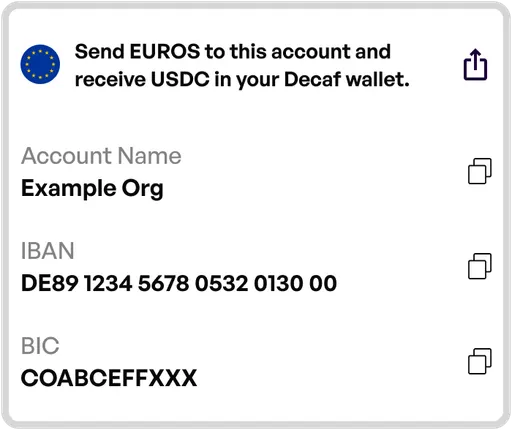 Example of Virtual Account for Euros
Transfer local currency, which the provider converts into USDC.
Receive USDC in the SDP wallet, ready for disbursement.